
Free Repertoire Builder v1.3 November Release
Version 1.3 is now live, bringing a wide range of improvements that make the Repertoire Builder more connected, more intuitive, and more enjoyable to use — and as always, the core platform remains completely free to use. My aim with this update was to enhance every part of the study experience, from reviewing games to exploring openings, preparing for opponents, and developing your repertoire.
As a solo developer working on this platform, I genuinely enjoy experimenting with different ideas and exploring new technologies to see what can make the experience better. This update reflects that curiosity and the ongoing effort to combine practical tools with thoughtful design, all while keeping the focus on helping players learn, train, and study in a way that feels natural and enjoyable.
Try it now, FREE: chessboardmagic.com/repertoirebuilder
Solitaire Integration
A New Way to Learn From Real Games
One of the biggest additions in this update is Solitaire, a new training mode built directly into the Repertoire Builder. I’ve always believed that working through real games, seeing how positions evolve, where mistakes happen, and which ideas appear repeatedly, is one of the fastest ways to improve.
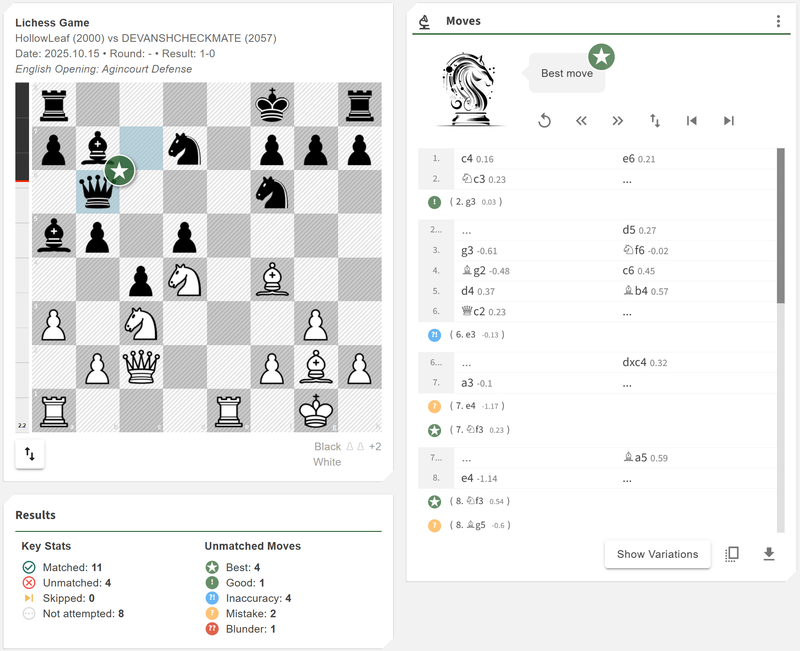
Solitaire makes that experience interactive. You can load games from your own library, paste PGNs, browse historic collections, or let the system choose a random classic. Once loaded, the game is analysed automatically with Stockfish, showing evaluation changes, blunders, inaccuracies, alternatives, book moves, and transpositions.
Solitaire has two modes:
- Review Mode — step through the actual game and study how it unfolded.
- Practice Mode — choose a side and try to guess the moves yourself, with optional attempt limits for added challenge.
It’s a highly effective way to reinforce patterns, link your opening ideas to middlegame structures, and deepen your practical understanding of chess.
Playbooks
Learning From Great Players and Their Styles
Playbooks are a new way to explore openings through curated reference trees built around well-known players and the lines they consistently rely on in practice. Instead of a general-purpose opening tree, each Playbook provides a clean, structured representation of how a specific player approaches key positions — their typical choices, preferred continuations, and the openings they lean on most often.
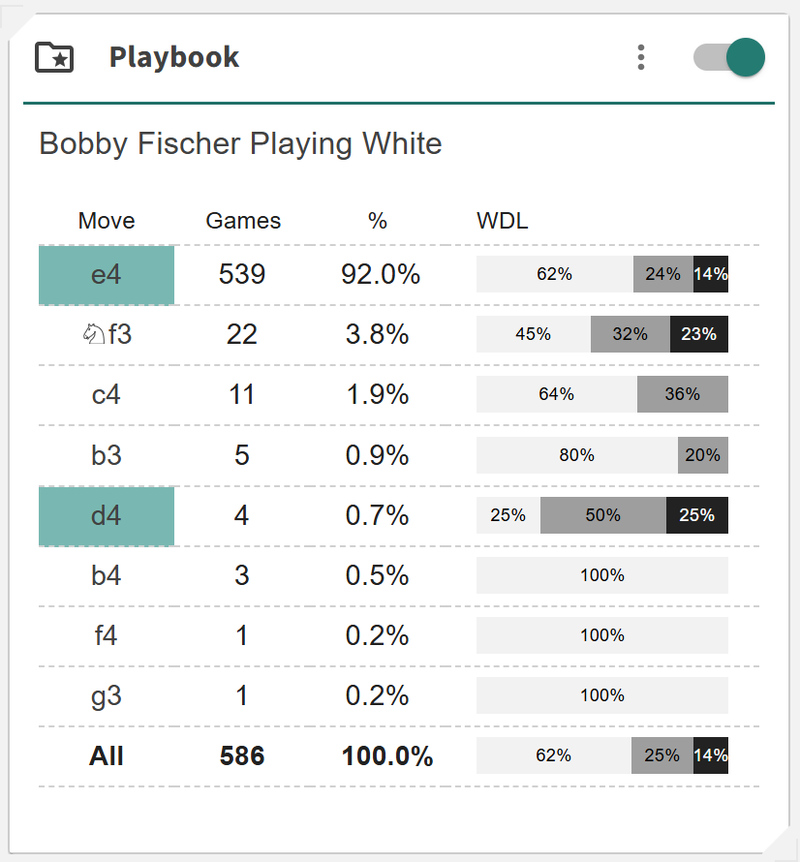
The real strength of Playbooks is how easily you can integrate them into your workflow. You can load any Playbook directly alongside your own repertoire and use it as a side-by-side reference. This makes it easy to compare ideas, explore alternatives, and refine your repertoire using real examples from players whose games you trust and admire.
For subscribers, Playbooks become an invaluable study companion — a practical way to deepen your opening understanding and strengthen your repertoire using high-quality, real-world reference material.
Practice Module Upgrades
Three key upgrades were made to the Practice Module:
New Bots
I have introduced a new Bots system where you can pick a bot that uses real moves from players like Magnus Carlsen, Hikaru Nakamura, Garry Kasparov, and others to generate the next sequence of moves. Each bot follows the continuations that consistently appear in that player’s real games, giving you a practical, human-like opponent to train against.
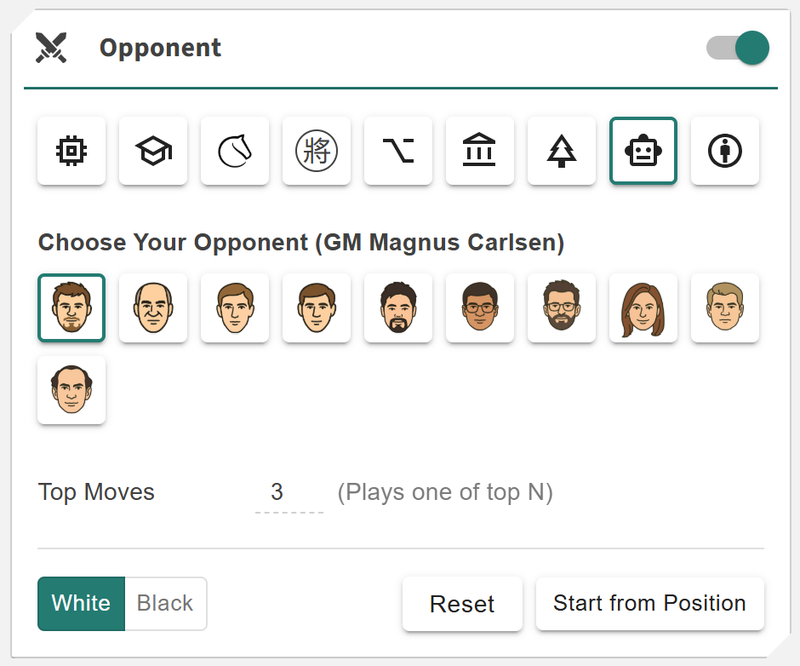
It’s a simple and effective way to test your repertoire, explore realistic follow-ups, and challenge your understanding against moves drawn directly from high-level play. More player-based bots are coming soon, along with new thematic bots built around specific ideas and patterns.
Opponent Preparation
Opponent Preparation is now fully integrated into the Practice Module. You can import a player’s historical games from Lichess or Chess.com, and the system builds a profile of their opening tendencies, favourite lines, and typical reactions.
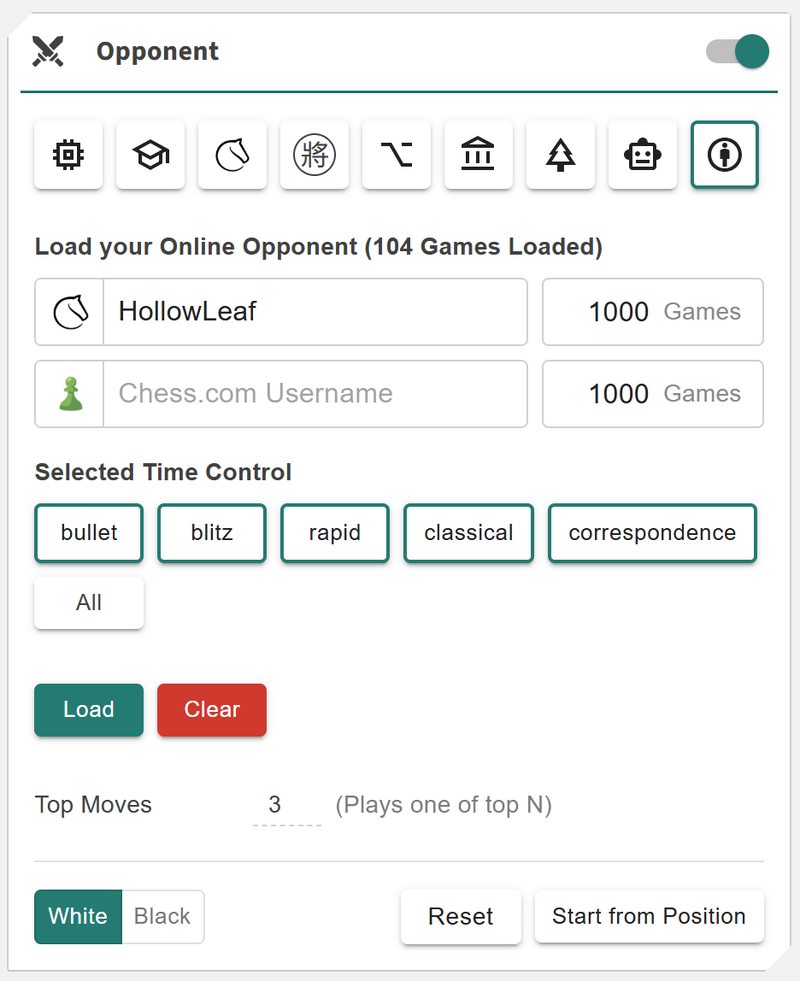
You can then practise directly against their simulated style — a useful tool whether you’re preparing for an online rival, a tournament match, or just someone you keep encountering. It turns preparation into something practical and interactive, making real-world matchups easier to approach with confidence.
Play Against Maia
Subscriber Only - You can now practise directly against Maia inside the Practice Module. Instead of playing against a traditional engine, you play against a model that predicts human moves at specific rating levels. This creates a very natural and realistic training experience because Maia follows the patterns, mistakes, and preferences that real players tend to show.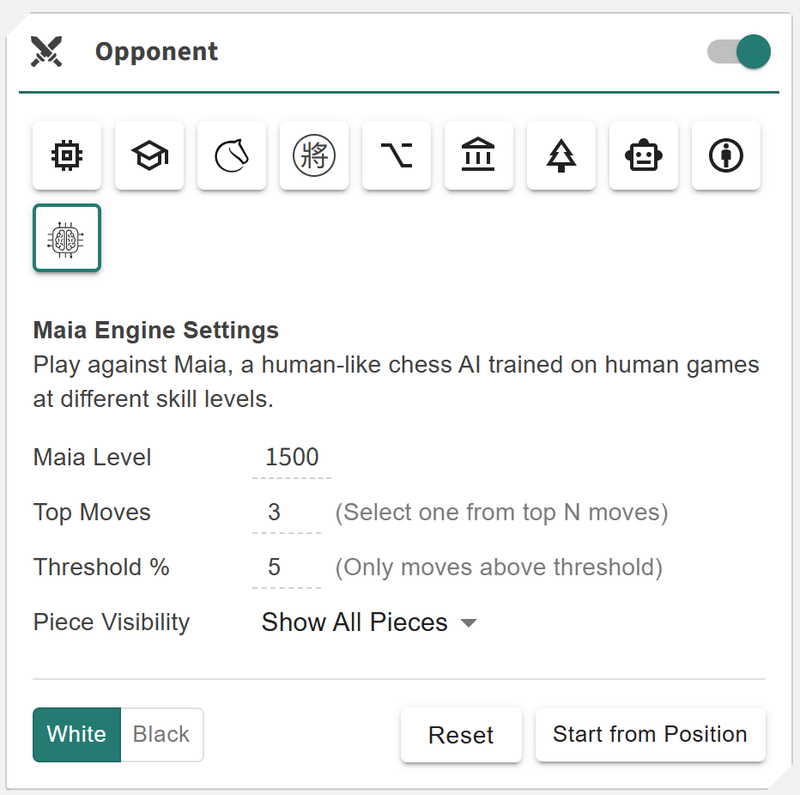
You can select a Maia rating tier such as 1100, 1500, or 1900, and the system will generate moves based on the probabilities Maia assigns to each legal option in the position. The result feels much closer to facing an actual opponent than playing against a purely optimal engine.
This is a practical way to test your repertoire, study typical human responses, and train decision making in positions where human tendencies differ from engine evaluations. It also complements the player-based bots, giving you a broader range of realistic practice opponents.
The New Onboarding Wizard
To help new users get started quickly, I’ve built a full Onboarding Wizard that guides you through the setup process in a simple and structured way.
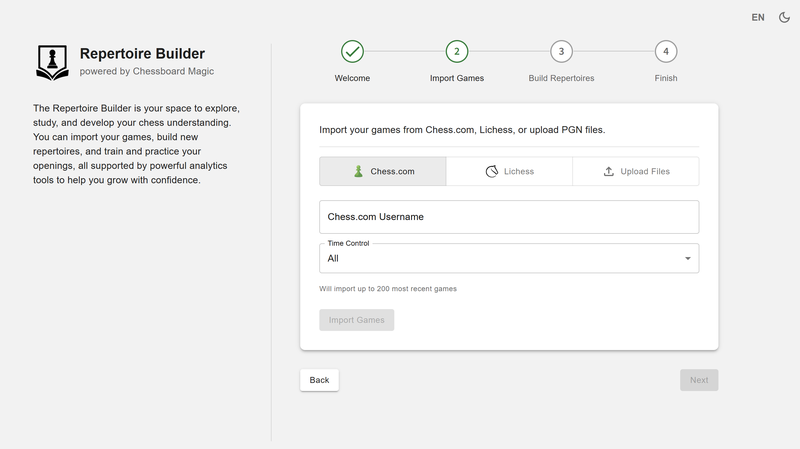
When you arrive for the first time, the wizard leads you through importing your games, generating personalised starter repertoires, reviewing and adjusting them, and learning where everything is. Instead of beginning with an empty workspace, you immediately get material based on your actual playstyle — which makes it much easier to explore, study, and build from.
It’s a big improvement for new users and helps everyone get value from the platform right from the start.
Maia Integration
Subscribers Only - One of the most exciting additions in this update is the first stage of Maia Integration, which brings the Maia neural-network engine directly into the Repertoire Builder. Maia is a research engine trained not to find the best move but to predict the move a human player would choose at different rating levels such as 1100, 1500, or 1900.
This gives you a completely different way to understand a position.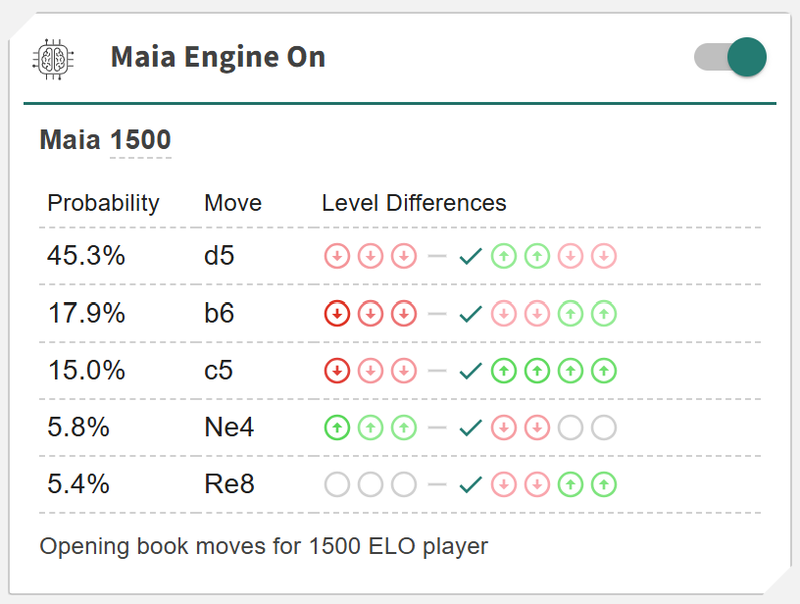
With Maia Integration enabled, you can view the current board position and instantly see the move probabilities across multiple rating tiers. Instead of providing a single engine move, Maia shows how human players at different levels tend to respond, including natural choices, common mistakes, and surprising alternatives.
This makes it a powerful tool for:
- Understanding how your opponents are likely to play in real games
- Spotting typical human tendencies and traps
- Seeing which ideas become more or less popular as skill increases
- Adding practical, human-centred insight alongside Stockfish analysis
Maia offers a fresh perspective that complements the existing engine tools, and it will continue to grow into a larger part of training, review, and preparation across the platform.
Bug Fixes & Improvements
This update also includes a set of fixes and refinements to improve stability, consistency, and overall performance across the platform:
- Repertoire Search Persistence: The search field in the Library Overview module now remembers your search terms across sessions, making navigation much smoother.
- Custom Board Colors: Added full support for custom chessboard themes, allowing you to personalise the black and white square colours. This gives you more control over the look and feel of your study environment, making it easier to create a visual style that’s comfortable and familiar.
- Moves Card Scroll Reset: Added automatic scroll-to-top behaviour when using the Reset button in the Moves Card for a cleaner and more predictable workflow.
- Material Imbalance Alignment: Fixed an alignment issue affecting the white pieces display in the Material Imbalance panel.
- Thumbnail Updates Restored: Thumbnails for library items can now be updated again. They default to the final position when importing a game, and can also be manually set.
- Performance Enhancements: Improved internal handling of very large repertoires, allowing the platform to remain responsive even beyond 20,000 moves per repertoire. (Smaller repertoires are still recommended for clarity and manageability.)
- Improved Scrolling Accuracy: Refined scroll behaviour across multiple components to make movement more accurate, consistent, and responsive.
- Library Overview State Persistence: Fixed an issue where the Library Overview page was not correctly persisting selected repertoires and other UI state across sessions.
- Custom Positions Reloading: Resolved a bug where Custom Positions did not automatically refresh the Reference Tree or Position Overview after loading.
Exploration & Experiments
Building Toward the Future
Alongside the main features, I’ve also been working on several experimental ideas that may develop into future additions:
- Maia2 Integration: Exploring the Maia2 neural-network engine running directly in the browser using ONNX Runtime. Unlike traditional engines, Maia2 predicts human decision-making rather than optimal moves, offering a fresh, insightful style of analysis.
- MCP (Model Context Protocol): Testing an early integration that would allow AI to interact with your repertoire data safely, permission-based, and fully transparent. The long-term goal is to support natural-language questions and deeper insights without compromising privacy.
- Publish & Share: Sketching out a system where repertoires can be made public or shared with collaborators, with role-based access such as Owner, Editor, and Contributor. This could open the door to shared study, coaching workflows, and team preparation.
- Deeper Tool Integration: Exploring ways to more tightly connect Playbooks, Practice, Library, Solitaire, and Game Review so the entire platform feels more unified and fluid between study modes.
- Tactical Theme Classification: Early research into building a custom neural network that can identify tactical and strategic themes directly from any position. The idea is to train a model that outputs probabilities for patterns such as forks, pins, discovered attacks, weak squares, mating nets, and other key motifs. This could become a powerful study aid by highlighting the underlying ideas in a position and giving players a clearer understanding of what to look for during training and repertoire building.
- Minerva Project: A long-term, heuristic-driven project that combines chess logic with modern language models to produce clear, human-style commentary on games and positions. This has been an ongoing 18-month personal journey, and development continues in the background.
These are still exploratory, but several are strong candidates to become part of the platform in the future.
A Final Thank You
Thank you to everyone who has been using the Repertoire Builder and offering feedback along the way. Your insights shape the direction of the platform and help me prioritise what matters most.
I am still learning what players want from a modern repertoire tool, and your input genuinely helps me fill gaps, refine features, and continue improving the experience. If you have a moment, please take the survey — and as a thank-you, you’ll be entered to win a lifetime Basic membership: Tell Us How You Build Your Repertoire
Try the Repertoire Builder v1.3 now, free:
https://chessboardmagic.com/repertoirebuilder
Join the community on Discord:
Kind Regards,
Toan Hoang (@HollowLeaf)
You may also like
 HollowLeaf
Notation Trainer
Practising Chess Notation CM HGabor
How titled players lie to you
This post is a word of warning for the average club player. As the chess world is becoming increasin… IM theScot
Life Hacks for Getting to IM
A post about the life-skills that help you in chess. HollowLeaf
Using Maia and Leela Chess Zero to Find Repertoire Gaps
A novel idea for chess developers FM MattyDPerrine
3 Lesser Known Websites to Improve Your Chess Game
Hidden gems that have flown under the radar HollowLeaf