
https://siderite.dev/blog/new-chrome-extension-lichess-tools/
LiChess Tools local file support!
Find puzzles similar to the current analyzed position
Intro
Exciting news today: I've implemented a new method of integrating information into Lichess functionality via LiChess Tools.
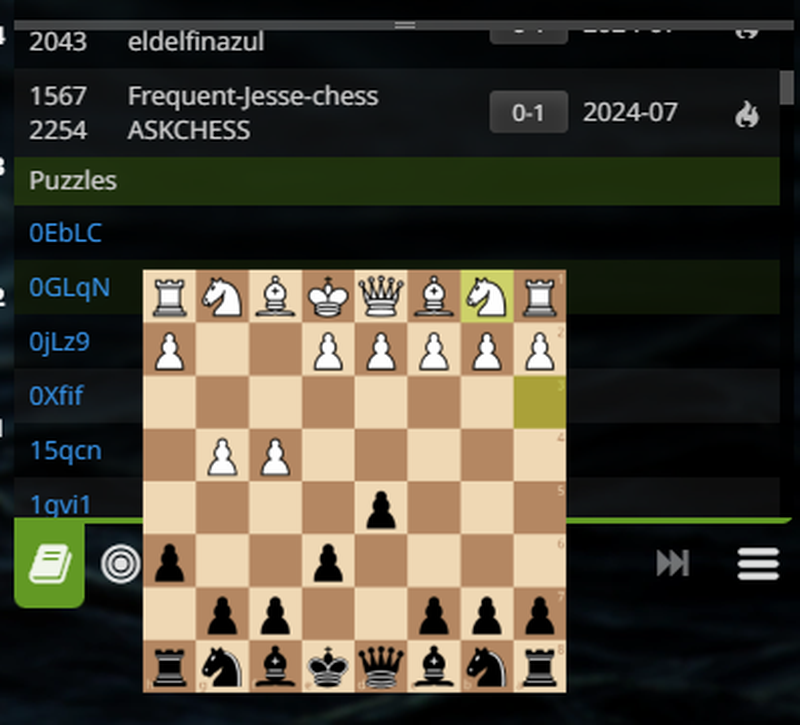
In this particular case we are talking about a local file (220MB compressed - 580MB raw) that needs to be downloaded and then selected in Preferences. Once that is done, you will see a list of puzzles in the Explorer window, with similar positions to the current on in the Analysis board or Study.
But this functionality is just a proof of concept of how one can integrate local data without external software or heavy computation. What else could we do with this? Local PGN databases, indexing of studies or games that you like, bookmarks of all kinds of stuff, media attachments, etc. The sky is the limit and that's why I am so excited
Update 3 Dec 2024
I've updated this with the changes added in the v2.3.176, which uses a larger file, but should give almost no false positives. You will have to download the latest nif file.
How to set it up
First you will need to install the LiChess Tools browser extension for Chromium or Firefox version 2.3.176 or higher.
Then you have to download a so called NIF file (N-gram Index Format) which is my own invention so far. Hmm... I wonder if there are other things like that out there already... Anyway, the file is about 220MB compressed and you can get it from here: puzzle.nif.zip. Save and extract it somewhere.
Then open the Lichess website, go to Preferences -> LiChess Tools -> Find position in Lichess puzzles and select the puzzle.nif file.

Then go to Analysis board or Study and you should find the list of puzzles in your Explorer window. When puzzles are found, a magnifying glass icon will appear in the Explorer tabs. Click it to scroll to the puzzle list.
Conclusion
My final goal for this is to enable the ability to use local files and folders in Lichess, with large databases like Mega, Caissa, etc. and also allow creating and curating your own files, like Chessbase does. Only, you know, for free. Unfortunately this is not easily made possible in browser JavaScript, especially in a cross browser situation, but it is possible.
However, if it were to be implemented in Lichess natively, using a separate application and an API like for external engines, I think it would become a huge resource and it would enable you to have access to all that information from any connected device using your account as long as the database machine is on. I get giddy just thinking about it.
Let me know what you think of this feature and as always Enjoy!
You may also like
 FM CheckRaiseMate
The Power of a Plan
And how to make the engine into an effective teacher GM NoelStuder
The simple way to learn a new opening
Studying a new opening doesn't have to be overwhelming. TotalNoob69
The world didn't end
... yet TotalNoob69
An unexpected insight on d-pawn pushes/openings
TL;DR; Pushed d-pawns indirectly defend the second rank f square. D2D4C2C4
Why Opening Statistics Are Wrong
Opening statistics, such as those in the opening explorer have a methodological flaw. They tend to s… FM CheckRaiseMate