
Generated by Fotor AI
Chess Forge - NEW: Online Library
The new version of Chess Forge (1.4) offers access to a dedicated library of PGN books.A few months ago, I introduced Chess Forge, a Free, Open Source Windows application for chess studies and training.
A new version has just been published with a major new feature offering access to the dedicated Chess Forge online library.
Accessing Chess Forge Online Library
When your PC is online, you can access the library from the main menu via File->Open Library. The content of the library will be listed in a new window:
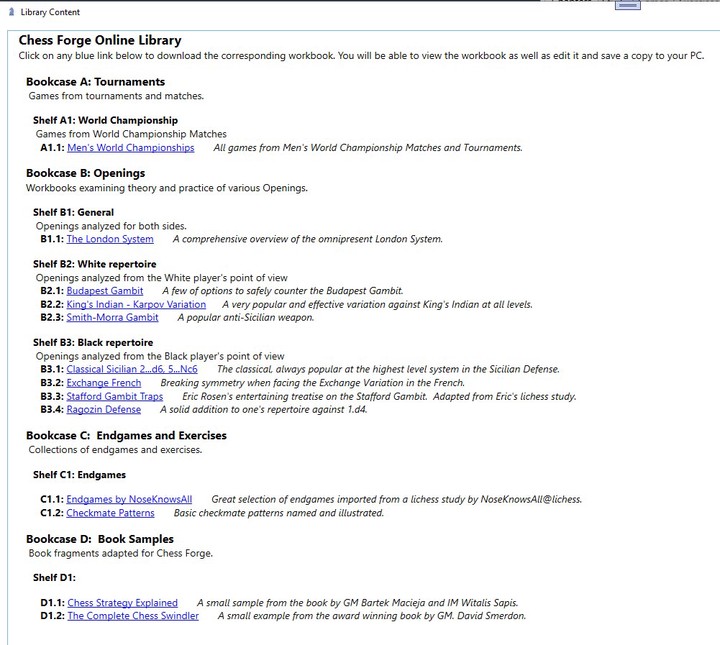
Click on any book (or "workbook" in Chess Forge's terminology) to open it in the program. You can view and edit it just as you would with a workbook loaded from your PC. You can also save your own copy locally, if you wish.
For those, not familiar with Chess Forge, the application's workbooks are files in an extended PGN format, as described in the program's help wiki.
Content of the Library
For starters, we have just over a dozen workbooks with a few more in the pipeline. The screenshot above reflects the content as of this writing, but expect it to grow.
Some of the workbooks are our compilations, a couple are adapted from lichess studies and a couple are samples of physical books transcribed into the Chess Forge's PGN format. In all cases, we have obtained permissions from the authors, and appropriately credited them.
To avoid any confusion, let me repeat that the library resides on an Internet server and is not installed together with Chess Forge on your PC. Therefore, all updates to the content will be visible to the users without the need to update the program (as long you have version 1.4 or higher). Simply select File->Online Library to check if there are any new items.
You may also like
 czbar
czbarEndgame Tragicomedies at the World Cup 2025
Rook endgames are notoriously difficult. Many a strong grandmaster has blundered even in the thoroug… czbar
czbarKing into the Line of Fire (Ke8-d8-c7)
In a departure from conventional strategy, King Magnus and King Anatoly steer their royal proxies to… czbar
czbar