
https://siderite.dev/blog/new-chrome-extension-lichess-tools/
Calculating your conversion rate
... a LiChess Tools use case
A few days ago, a user of the LiChess Tools browser extension asked me if I could write a feature to calculate "the conversion rate", defined as the percentage of games where a +2 evaluation has been reached and resulted in victory.
For sure it was an interesting idea, and very useful as a metric, but it would involve long running engine analysis that wouldn't even be preserved anywhere, since LiChess Tools is a browser extension working locally only.
But wait! There is a way to calculate the conversion rate using the games you have already analyzed, using the PGN Editor. Here is how you do it:
- Go to your profile
- Select "Export games" from the hamburger menu

- Select:
- Color: White
- Analysis: Yes
- Include: PGN tags, Evaluation
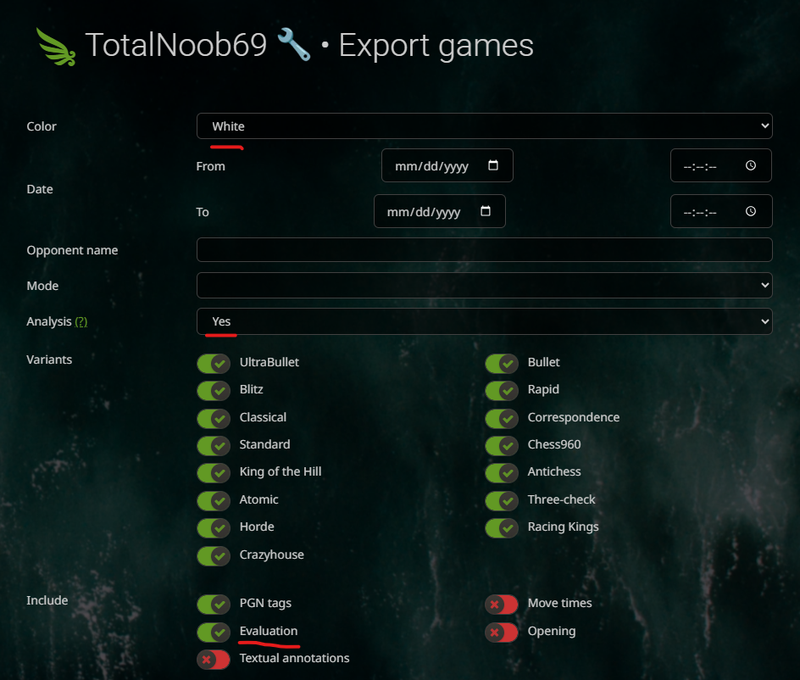
- Click "Download" and wait to get the file
- Go to PGN Editor - this is a feature provided by LiChess Tools
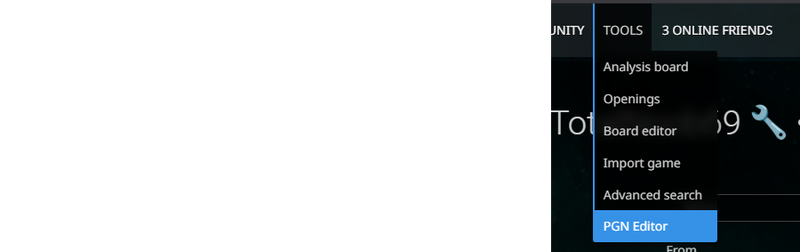
- Click "Upload" and select the downloaded file
- Click "Search" and use the query "eval>2"
- Click "Result" to keep just what was found - note down the number of games as the total
- Click "Search" and use the query "Result=1-0" - note down the number of found games as the wins
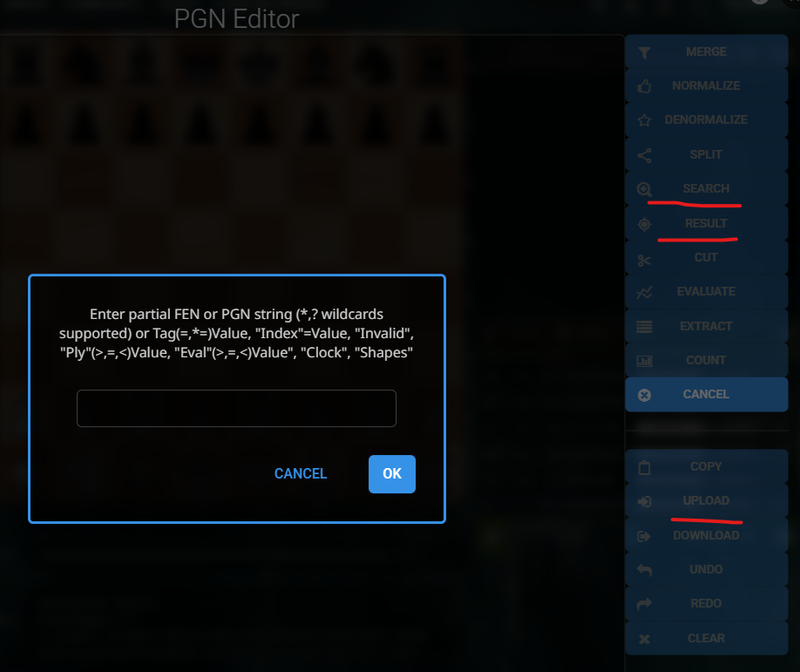
Your conversion rate is the percent of wins over total games. The feature was already there!
To calculate the Black conversion rate, use the same steps, but the queries "eval<-2" and "Result=0-1". And of course, download the games you played as Black.
Something to take into account is that, unless you religiously computer analyzed all of your games, the conversion rate will be biased towards large values. Surely you will not have requested computer analysis for games where you blundered your queen or lost on time. Many people avoid analyzing their losses, for emotional reasons, even if those are the ones that require the most scrutiny.
Also, this also captures the games where you got a large eval right before winning, so it wasn't as much of a conversion as an opponent blunder.
There are ways to refine this, though. You can for example filter the games where you have eval>2, then search for games where eval<-2 and then click "Cut" and use the query "Result". This will eliminate the results where the opponent was also winning, giving you the "clean" games. Or you could use "Cut" with the query "ply=30" to eliminate the moves over move 15. PGN Editor can be used in multiple ways and if you have more ideas, let me know, I can add them in if they seem useful ideas.
Anyway, this is me, showing off another useful feature of LiChess Tools. Enjoy!
You may also like
 CM HGabor
How titled players lie to you
This post is a word of warning for the average club player. As the chess world is becoming increasin… TotalNoob69
An interesting response to the Sicilian/Scandi that does unusually well
... not objectively good, but statistically crushing ChessMonitor_Stats
Where do Grandmasters play Chess? - Lichess vs. Chess.com
This is the first large-scale analysis of Grandmaster activity across Chess.com and Lichess from 200… MEGALODON777hs
A Resource of World Champions
All the World Championship games in one place TotalNoob69
An unexpected insight on d-pawn pushes/openings
TL;DR; Pushed d-pawns indirectly defend the second rank f square. TotalNoob69